
How can we help you today?
Install, activate, and get help.
Use this page for system requirements, Windows setup, license activation, release notes, and contact.
30-Day Free Trial • No Credit Card Required • Windows OS Only
System & Software Requirements.
Confirm the workstation meets these requirements before you install.
System
Processor
Intel Core i5 or equivalent
RAM
8 GB or more
Storage
500 MB free space
Display
1280x720 resolution or higher
Software
Operating System
Windows 10 or Windows 11
PDF Reader
Adobe Acrobat Reader (required for PDF reports)
Microsoft Excel
Optional. Useful for editing Excel or CSV files; not required to run ToxGenie.
Microsoft Word
Optional. Useful for opening and editing .docx reports; not required to run ToxGenie.
Installation Guide for Windows.
STEP 1
- Click the Free Trial button to download the .zip file.
STEP 2
- Extract the .zip.
- Run the .exe.
- Follow the on-screen steps to finish installation.
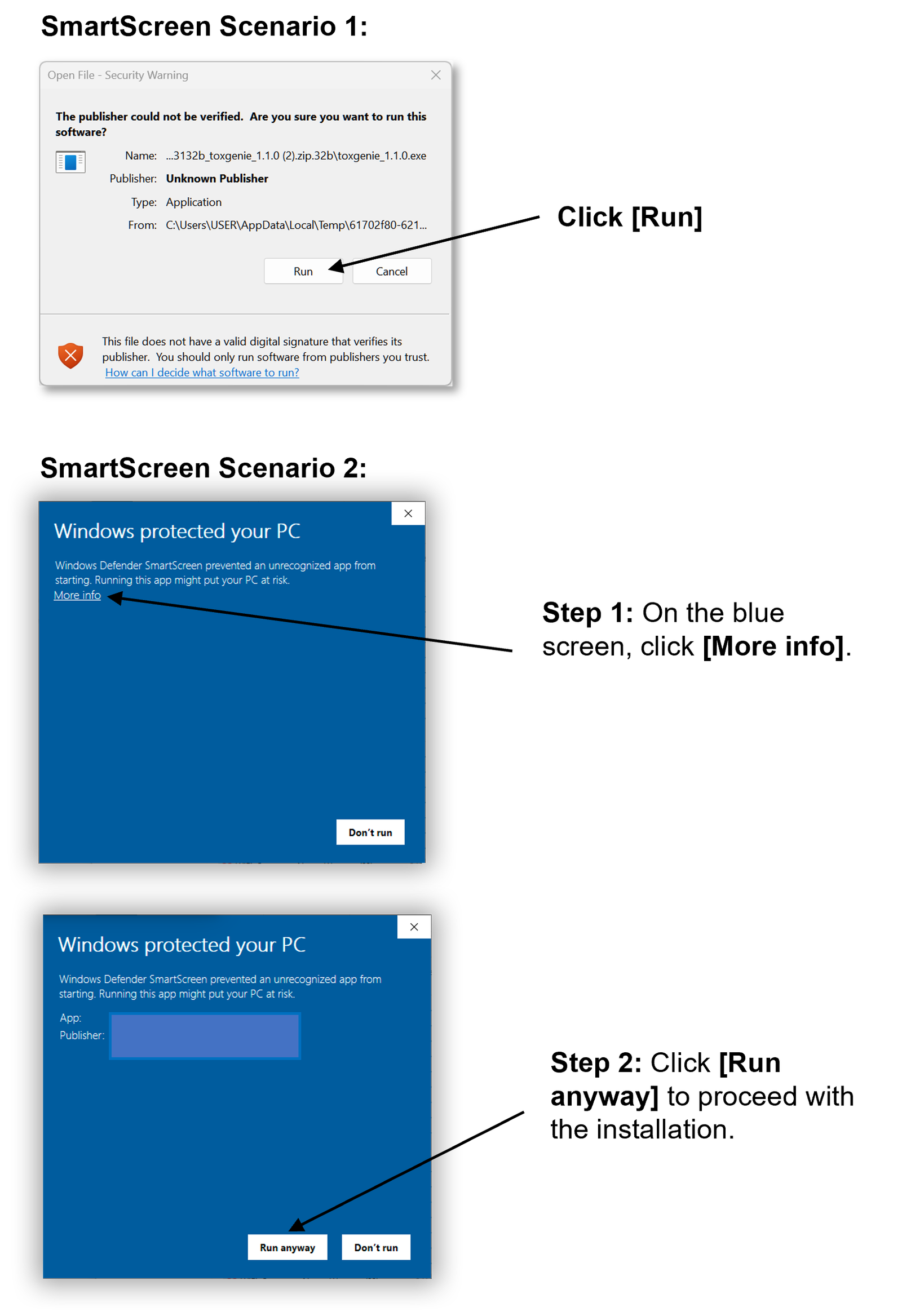
Windows Defender SmartScreen Warning
A SmartScreen warning can appear because ToxGenie is a newly published publisher. This is expected.
- Click ‘More info’.
- Click ‘Run anyway’.
Activating Your Annual Subscription.
These steps are for Windows.
Step 1: Check Your Trial
- Before the trial ends, open About in ToxGenie and note the expiry date.
Step 2: Purchase
- Click Subscribe Now. Payment is processed by Lemon Squeezy.
Step 3: License Key
- After payment, a license key is sent to your email. That key activates the full version for one year.
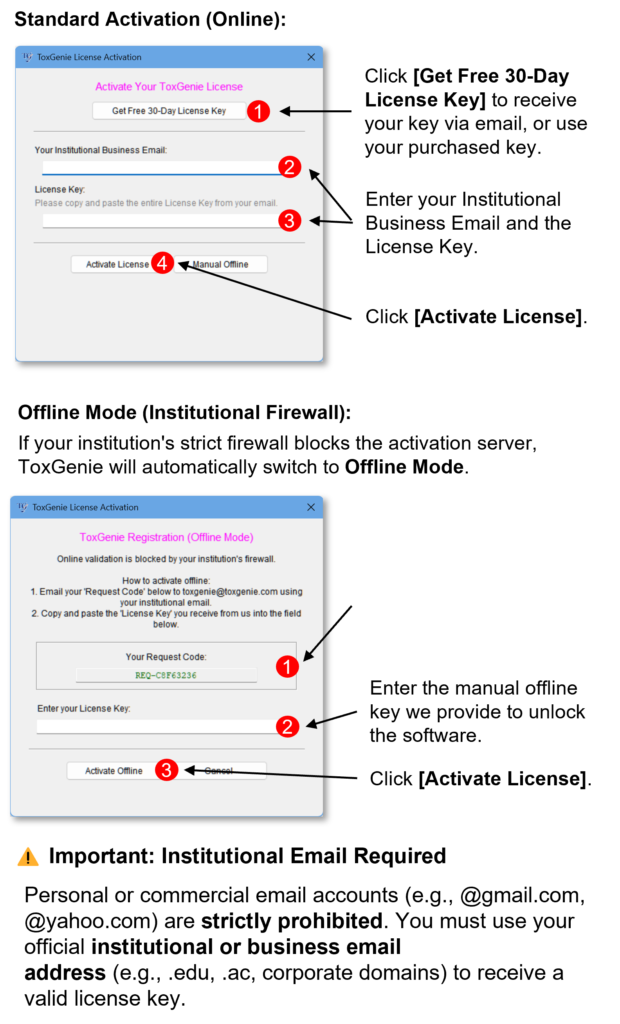
Step 4: Activate (online)
- Start ToxGenie.
- Open Help on the top menu.
- Choose Install License.
- Paste the key from the email (preferred) or type it.
- Click Submit. ToxGenie verifies the subscription and unlocks Academic or Professional features.
Step 5: Offline (institutional firewall)
If the PC cannot reach the license server, use Offline Mode in the same Install License window. Check Offline Mode, enter the key, and click Submit. Follow the on-screen request/response steps. Campus or company emails may be required.
Let’s Work Together!
Don't Hesitate To Get in Touch.
If this page does not answer the question, send a message.
We reply to the address you enter.
Release Notes & Update History.
Updates for compliant, clearer toxicity data analysis.
ToxGenie Version 1.3.2 (Current)
Release Date: September 16, 2026
“Install from the website. Auto-update now asks Yes or No.”
[ Updates ]
- Please install 1.3.2 from this website if you are using 1.3.0 or 1.3.1. Do not wait for the in-app auto-update alone. On those versions the update file may download without an install window.
- Yes/No after download: After the update file is ready, ToxGenie asks whether to install now. Yes closes ToxGenie, installs the update, and restarts. This includes the check at startup.
- Help → Check for Updates…: You can also install from the Help menu. If a check is already running, wait until it finishes, then choose the same menu again.
ToxGenie Version 1.3.1
Release Date: September 15, 2026
“Clearer statistics. Matching PDF and Word reports. Easier guidance.”
[ Statistical Methods ]
- Normality and Equal Variance (α = 0.01): Shapiro–Wilk and Levene tests now use α = 0.01, as in U.S. EPA and CETIS for studies with few replicates. The main comparison test remains α = 0.05.
- Clustered Quantal Trend: When Quantal Data are recorded by replicate vessel (tank or chamber), Dose–Response Trend Analysis can use the Rao–Scott Cochran–Armitage test instead of the standard Cochran–Armitage test.
- NOEC/LOEC or NOAEL/LOAEL: Hypothesis Tests use the label that matches the study type. Algae growth inhibition reports use NOEC/LOEC only.
[ Professional Reporting ]
- PDF and MS Word Match: The MS Word report uses the same wording, tables, and notes as the finalized PDF.
- Values as Entered: Numbers and labels you enter are shown in the report as recorded.
- Analyst and Approval: Each report has Analyst and Signature, then Approved by ( ): for a handwritten name and role (Study Director, advisor, or reviewer). This is not an electronic signature.
[ User Interface ]
- Same Important Notice Design: Column selection, data-type checks, and related messages now use one card layout across analysis modules.
ToxGenie Version 1.3.0
Release Date: September 3, 2026
“Original Data First. Zero-Manual Workflow. Smart Subscription & License Management.”
[ User Interface (GUI) Overhaul ]
- Modernized & Sleek Design: ToxGenie’s entire Graphical User Interface (GUI) has been completely revamped. The new intuitive and modern design ensures a much smoother, user-friendly, and pleasant analysis workflow.
[ New Statistical Analysis Features ]
- Trend-based Multiple Group Comparisons: Evaluate monotonic dose-response relationships by comparing treatment groups to a control. ToxGenie automatically applies Williams’ test or Shirley’s test based on the data distribution.
- Repeated Measures ANOVA: Assess time and treatment effects for data collected from the same subjects over multiple time points. This includes automated post-hoc pairwise comparisons (such as Dunnett’s, Steel’s, Student’s t-test, or Mann-Whitney).
[ Professional Reporting & Enhancements ]
- New ‘Summary’ Section & Stability Fixes: Exported reports now feature a concise ‘Summary’ section, allowing users to grasp the overall analysis results at a glance. Additionally, minor report generation bugs have been resolved to enhance system stability.
- Smart Folder Memory: After executing
[Estimation], ToxGenie now remembers your selected save folder for PDF or MS Word reports, automatically applying that directory for your next analysis. - Unencrypted PDF Reports: Analysis PDFs are intentionally generated without password protection. Please secure and archive these reports according to your facility’s internal SOPs (Standard Operating Procedures).
[ Smart Subscription & License Management ]
- Lemon Squeezy Integration: We have integrated Lemon Squeezy, a secure and globally trusted payment platform, to provide a seamless subscription and licensing experience.
- Automated License Issuance & Management: License keys are now generated immediately and automatically upon subscription. Users can effortlessly manage their active subscriptions and keys directly through the intuitive Lemon Squeezy system.
[ Data Integrity & Original Records ]
- Original Study Files Maintained: The Excel or CSV file created under your facility’s SOP remains the absolute original record. ToxGenie guarantees data integrity by never overriding or replacing your original file with a proprietary format.
- ToxGenie Session Files (.tox):
[File] > [Save As ToxGenie]securely stores your current working session only. It is not a substitute for the original study file. To resume your work, reopen it via[File] > [Open ToxGenie]. - In-App File Opening: For strict workflow control, double-clicking a
.toxfile in Windows Explorer does not auto-launch ToxGenie. Always open your session files directly from the application’s File menu.
[ Data Preparation & Conversion ]
- Ordinal Data Templates:
[Create Data Sheet]now includes specialized templates for histopathology severity, clinical signs, and FOB scores, offering analysis paths that do not force parametric assumption tests. - Secure Data Conversion:
[Data Sheet Utility] > [Convert to ToxGenie Data]instantly builds a ToxGenie-ready sheet from your existing tables. Your original cell values remain completely untouched, and a new sheet is safely generated after user confirmation.
ToxGenie Version 1.2.0
Release Date: July 20, 2026
“The Ultimate Compliance, Security, and Validation Upgrade”
[ GLP Compliance & Validation Kit ]
- Declaration of Conformity: Declares system reliability and software compliance built fundamentally upon GAMP 5 Category 3 guidelines.
- Part 11 White Paper: Details our sophisticated hybrid architecture designed to defend flawless Data Integrity (21 CFR Part 11 / Annex 11) without requiring heavy, complex database infrastructure.
- IQ Protocol (Installation Qualification): A structured protocol that automatically scans and verifies user workstation specifications while incorporating required manual human verification checkpoints.
- OQ Protocol (The Masterpiece): The ultimate automation script. With a single click, it autonomously executes and analyzes three regulatory-aligned toxicity datasets (Sperling-Karber [SK], Hypothesis testing, and Algae growth inhibition), generates comprehensive PDF outputs, and instructs users to verify precision against official EPA/OECD reference benchmarks.
[ Professional Reporting & Customization ]
- Custom Watermark Integration: Maintain document custody and secure intellectual property. Users can now easily embed personalized, highly visible watermarks into exported PDF and MS Word (.docx) analysis reports.
ToxGenie Version 1.1.0
Release Date: June 20, 2026
“The Most Powerful and Intuitive Update for Toxicologists”
[ Advanced Statistical Engine]
- Hypothesis Testing for Quantal Data: Full support for analyzing quantal (binary) toxicity data is now integrated.
- Intelligent Point Estimation: Features both Linear and Non-Linear Regression methods. The software now automatically identifies and selects the best-fit model for your dataset, ensuring maximum accuracy for LC/EC estimations.
[Professional Reporting & Compatibility]
- Dual-Format Export (PDF & MS Word): Beyond PDF, you can now export results directly to MS Word (.docx). The reports are fully editable, allowing for easy integration into GLP final reports or manuscripts.
- Improved Reporting Workflow: Added a real-time progress indicator during report generation for better task monitoring.
[Data Handling & Efficiency]
- Excel-to-ToxGenie Seamless Integration: Advanced clipboard support allows you to Copy & Paste directly from MS Excel into the ToxGenie Data Sheet while preserving data structure.
- Optimized Performance: Re-engineered the internal processing logic to deliver faster execution speeds, even with large-scale toxicity data.
- Refined Data Sheet: Enhanced the data entry and editing interface for a smoother, more responsive user experience.
[System Maintenance]
- The update system has been improved to ensure you are always running the latest version.
ToxGenie Version 1.0.4
Release Date: March 1, 2026
[Enhanced Data Management & UX]
- Intuitive ‘Create Data’ Workflow: Redesigned the data creation interface to provide a more streamlined input process, allowing researchers to set up experimental parameters with minimal effort.
- Clipboard Integration (Copy & Paste): Implemented full support for Copy and Paste functionality within the Data Sheet. This allows seamless data transfer between ToxGenie and external software like Microsoft Excel, significantly reducing manual entry errors.
[Statistical Visualization & Rigor]
- 95% Confidence Intervals (CI) in Graphs: Analysis result charts now include automatically generated 95% Confidence Interval overlays. This provides a visual representation of statistical precision and data variability for LC50/EC50 estimations.
- Refined NOEC & LOEC Determination Logic: Optimized the decision-tree algorithms for No Observed Effect Concentration (NOEC) and Lowest Observed Effect Concentration (LOEC). This improvement ensures more robust results when handling non-monotonic dose-response data.
ToxGenie Version 1.0.3
Release Date: September 17, 2025
[Refined Estimation Logic]
- Initial NOEC/LOEC Integration: Implemented the foundational logic for effect concentration estimations.
- Confidence Interval Calibration: Improved the calculation of 95% confidence intervals for acute toxicity endpoints.
[System Stability]
- Bug Fixes: Resolved minor UI glitches when switching between data sheets.
- File Compatibility: Enhanced the parser for
.xlsxand.csvfiles to prevent data loss during import.
ToxGenie Version 1.0.0
“A Milestone in Toxicity Data Analysis”
Release Date: August 25, 2025
Hello, ToxGenie Community!
We are proud to announce the official release of ToxGenie v1.0.0. This solution was born from over 30 years of frontline research in ecotoxicology. Having faced the limitations of manual spreadsheets and fragmented statistical tools, we developed ToxGenie to provide a streamlined, reliable, and regulatory-compliant environment for scientists worldwide.
Core Features of Version 1.0.0:
- Scientific Core: Custom-built engine for calculating LC50, EC50, and NOEC/LOEC with high statistical rigor.
- Regulatory Alignment: Fully compliant with OECD, US EPA, EU-REACH, and K-REACH testing guidelines.
- Workflow Efficiency: A 3-step intuitive workflow (Input → Analyze → Report) designed to save up to 70% of analysis time.
- Data Integrity: Secure data handling and professional PDF reporting for regulatory submissions.
Frequently Asked Questions
Can I use ToxGenie on a Mac (macOS)?
ToxGenie is built for Windows 10/11. Mac users may run it on a virtual machine such as Parallels.
My PDF report is not generating properly. What should I do?
Install Adobe Acrobat Reader. It is required to generate and open ToxGenie PDF reports.
Can multiple users share one license code?
No. Each license key is bound to a user and machine. For lab or institution licenses, email toxgenie@toxgenie.com.
Do you offer a free license for students?
Master’s and Ph.D. students writing a thesis may receive a complimentary 1-year license. A second year is granted if, before the first year ends, you email us that the thesis has been submitted or is in preparation. Maximum: 2 years. Apply from your university email; see Pricing.
What if I get a new computer?
Install ToxGenie on the new PC, then email toxgenie@toxgenie.com for a new license code.
Ready to automate your toxicology analysis?
Join the researchers and GLP contract research organizations saving hours on every study.