
The ToxGenie Features & Philosophy
Zero Manuals. Zero Learning Curve.
ToxGenie features is engineered so you can start your analysis right now without any prior training.
Forget daunting manuals spanning hundreds of pages. Our intuitive workflow guides you from start to finish seamlessly.
30-Day Free Trial • No Credit Card Required • Windows OS Only
Why Zero Manuals, Zero Learning Curve?
Because your time should be spent on research, not on figuring out how to use a software or studying statistics.
Learning Curve
- Traditional tools: Requires weeks or months to master complex coding scripts or navigate unintuitive, generic menus.
- ToxGenie Features: Start your analysis instantly with an intuitive, 2-step workflow that requires zero prior training or manuals.
Statistical Error Risk
- Traditional tools: High risk of human error due to manual data entry, complex formula mistakes, and improper test selection.
- ToxGenie Features: Ensures zero-error precision with an automated engine that applies built-in statistical logic for every data type.
Report Generation
- Traditional tools: Hours are wasted on manual data formatting, chart creation, and assembling professional reports in spreadsheets.
- ToxGenie Features: Generate standardized, audit-ready PDF or Word reports instantly with a single click after your analysis is complete.
Is ToxGenie as scientifically rigorous as SAS, SPSS, or R?
Absolutely. ToxGenie uses the same high-level biostatistical models used in R and SPSS, such as Dunnett’s test, Probit analysis, and non-linear regression. The only difference is the interface; we’ve removed the complexity of coding and generic menus to provide a streamlined workflow specifically for toxicity data.
How does ToxGenie help with peer review or regulatory audits compared to manual methods?
Manual methods often leave “paper trails” that are hard to verify. ToxGenie generates standardized, audit-ready reports that clearly show the methodology and statistical logic used. This transparency significantly reduces the risk of critical comments during peer reviews or regulatory submissions (OECD, EPA, ICH).
I have been using Excel for years. Why should I switch to ToxGenie?
While Excel is familiar, it lacks the specialized statistical logic required for regulatory compliance (e.g., specific tests for quantal vs. continuous data). ToxGenie not only automates the calculations to prevent errors but also ensures your results follow OECD and FDA guidelines, which Excel cannot do natively.
Every Toxicity Data Analysis in Just 2 Simple Steps
Every ToxGenie analysis follows the same 2-step workflow, regardless of the endpoint you are calculating.
ToxGenie takes care of everything else.
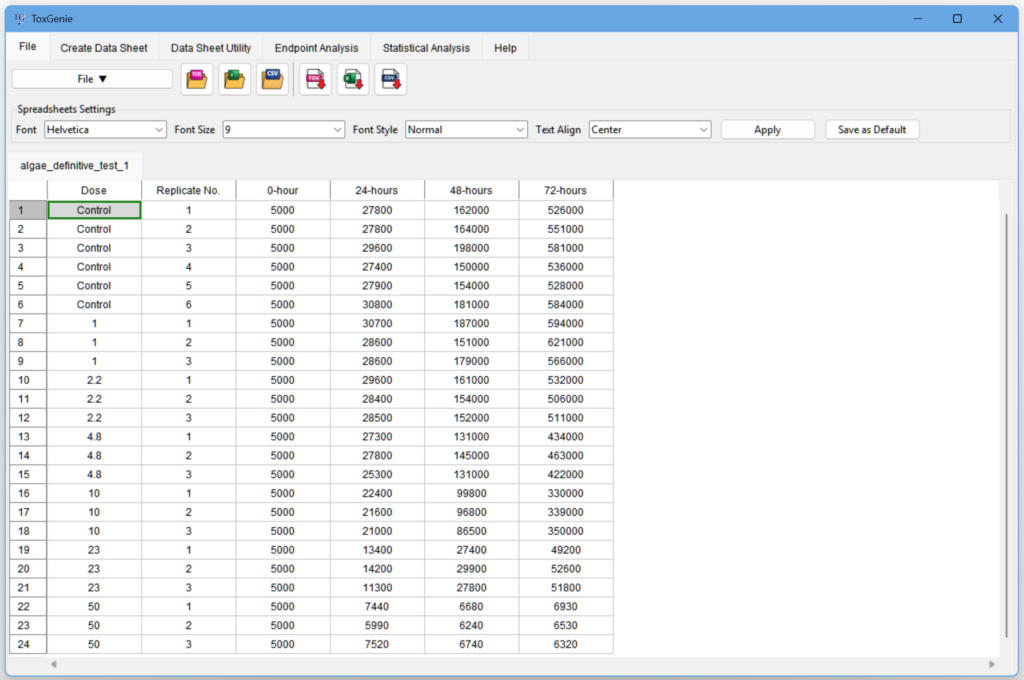
Enter Your Test Data
Option 1: Manually enter data using the ‘Create Data Sheet’ feature based on your data type.
Option 2: The most recommended method is to edit the file in the sample data directory using Excel, and then import it using the File menu.
Select an Analysis Method
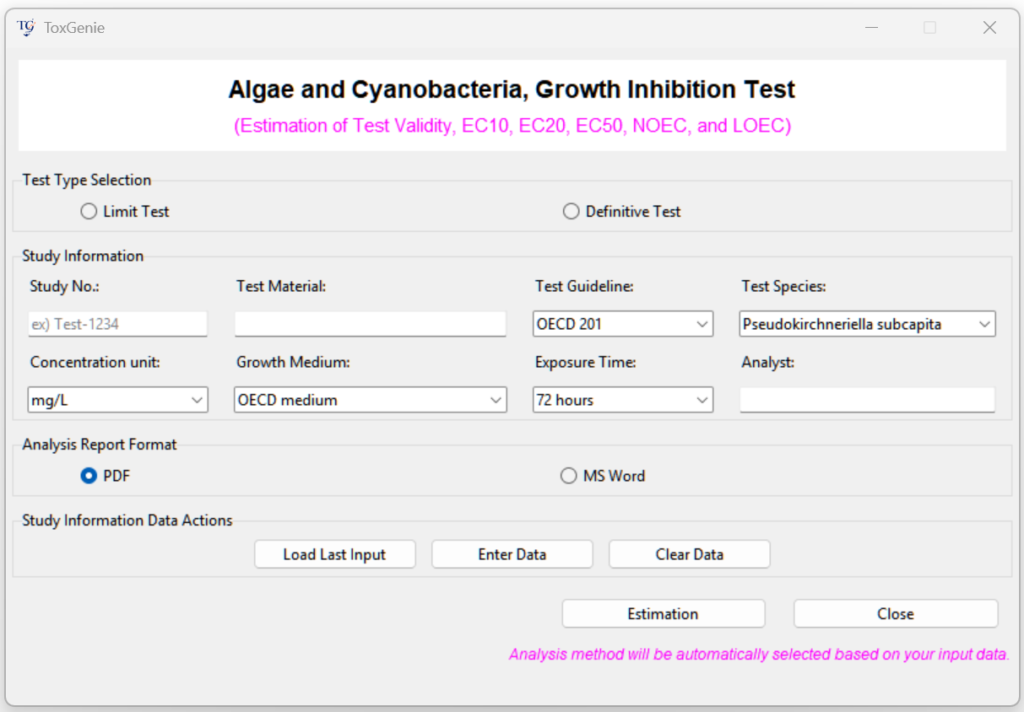
- Select an analysis method in the ‘Endpoint’ or ‘Statistical Analysis’ tab.
- Enter or select all information related to the test.
- Click estimation button to generate Analysis Report.
Which toxicity data types does ToxGenie support?
ToxGenie is designed to handle the three key types of toxicity study data:
- Quantal Data: Proportions or percentages, such as “3 out of 7 fish died.”
- Count Data: Non-negative integers, such as counting malformations or colonies.
- Quantitative/Continuous Data: Measurements on a continuous scale, such as organ weight, AST/ALT levels, or food consumption.
Why is identifying the correct data type the first step in toxicity data analysis?
Identifying your data type is crucial because the statistical method you apply depends entirely on it. Whether you have Quantal Data (e.g., mortality rates), Count Data (e.g., mutant colonies), or Quantitative/Continuous Data (e.g., body weight), using the wrong test can lead to distorted p-values and flawed results like inaccurate NOEC, LOEC, or NOAEL. ToxGenie helps you identify these types early to ensure scientific integrity.
What are the risks of using inappropriate statistical methods for toxicity studies?
Using an incorrect analysis method—no matter how sophisticated—compromises your results. For example, converting quantal data to percentages and running an ANOVA reduces statistical power and increases error. Such flaws can lead to critical comments during peer reviews or even rejection in regulatory submissions to agencies like the FDA, EPA, or OECD.
Built by a Researcher, for Researchers
ToxGenie is more than software; it is a solution born from three decades of laboratory experience.
Expert-Driven, Not Just Code-Driven
Unlike tools built by generic developers, ToxGenie is engineered by a toxicologist with 30+ years of experience in ecotoxicology and risk assessment.
Continuous Evolution
Toxcology and regulations don’t stand still. I am committed to continuously updating ToxGenie with new statistical methods tailored to evolving OECD Test Guidelines (TG).
Deep Empathy for Your Workflow
I spent 30 years wrestling with rigid software when I should have been focused on science. I know your frustrations because I have lived them. ToxGenie is my mission to ensure that you—and the next generation of researchers—can spend your time thinking about toxicology, not fighting with statistics.
We are toxicity researchers, not statisticians.
Ready to automate your toxicology analysis?
Join the researchers and GLP contract research organizations saving hours on every study.